'/%3e%3cpath%20d='M20%200C31.0454%200.000263888%2039.9999%208.95455%2040%2020C39.9999%2030.962%2031.1805%2039.8647%2020.25%2039.999C20.2428%2039.9991%2020.2348%2039.999%2020.2275%2039.999V40C20.2173%2040%2020.2065%2039.9991%2020.1963%2039.999C20.1311%2039.9996%2020.0653%2040%2020%2040V39.9941C18.9137%2039.9663%2017.8401%2039.7415%2016.835%2039.3252C15.76%2038.8799%2014.7828%2038.227%2013.96%2037.4043C13.137%2036.5813%2012.4835%2035.6036%2012.0381%2034.5283C11.5928%2033.4531%2011.3633%2032.3005%2011.3633%2031.1367V21.1904L15%2023.29V31.1367C15%2031.823%2015.1358%2032.5026%2015.3984%2033.1367C15.6611%2033.7708%2016.0459%2034.3477%2016.5312%2034.833C17.0164%2035.3181%2017.5927%2035.7032%2018.2266%2035.9658C18.842%2036.2207%2019.5013%2036.3546%2020.167%2036.3623C20.1795%2036.3622%2020.1925%2036.3625%2020.2051%2036.3623C29.1474%2036.2525%2036.3632%2028.9687%2036.3633%2020C36.3632%2010.9629%2029.0371%203.63698%2020%203.63672C18.3456%203.63673%2016.7505%203.88277%2015.248%204.33789L11.2344%202.01953C11.3217%201.97623%2011.4102%201.93338%2011.499%201.8916C14.081%200.677617%2016.9642%201.31978e-05%2020%200Z'%20fill='url(%23paint1_linear_3622_27254)'/%3e%3ccircle%20cx='13.179'%20cy='17.2727'%20r='2.27273'%20fill='%237F6AA0'/%3e%3cdefs%3e%3clinearGradient%20id='paint0_linear_3622_27254'%20x1='32.2865'%20y1='6.36342'%20x2='-0.0294657'%20y2='36.0851'%20gradientUnits='userSpaceOnUse'%3e%3cstop%20offset='0.163105'%20stop-color='%23D76F70'/%3e%3cstop%20offset='1'%20stop-color='%237F6AA0'/%3e%3c/linearGradient%3e%3clinearGradient%20id='paint1_linear_3622_27254'%20x1='40'%20y1='0'%20x2='9.66985'%20y2='38.7763'%20gradientUnits='userSpaceOnUse'%3e%3cstop%20stop-color='%23DB6F6E'/%3e%3cstop%20offset='1'%20stop-color='%23F7BA29'/%3e%3c/linearGradient%3e%3c/defs%3e%3c/svg%3e)
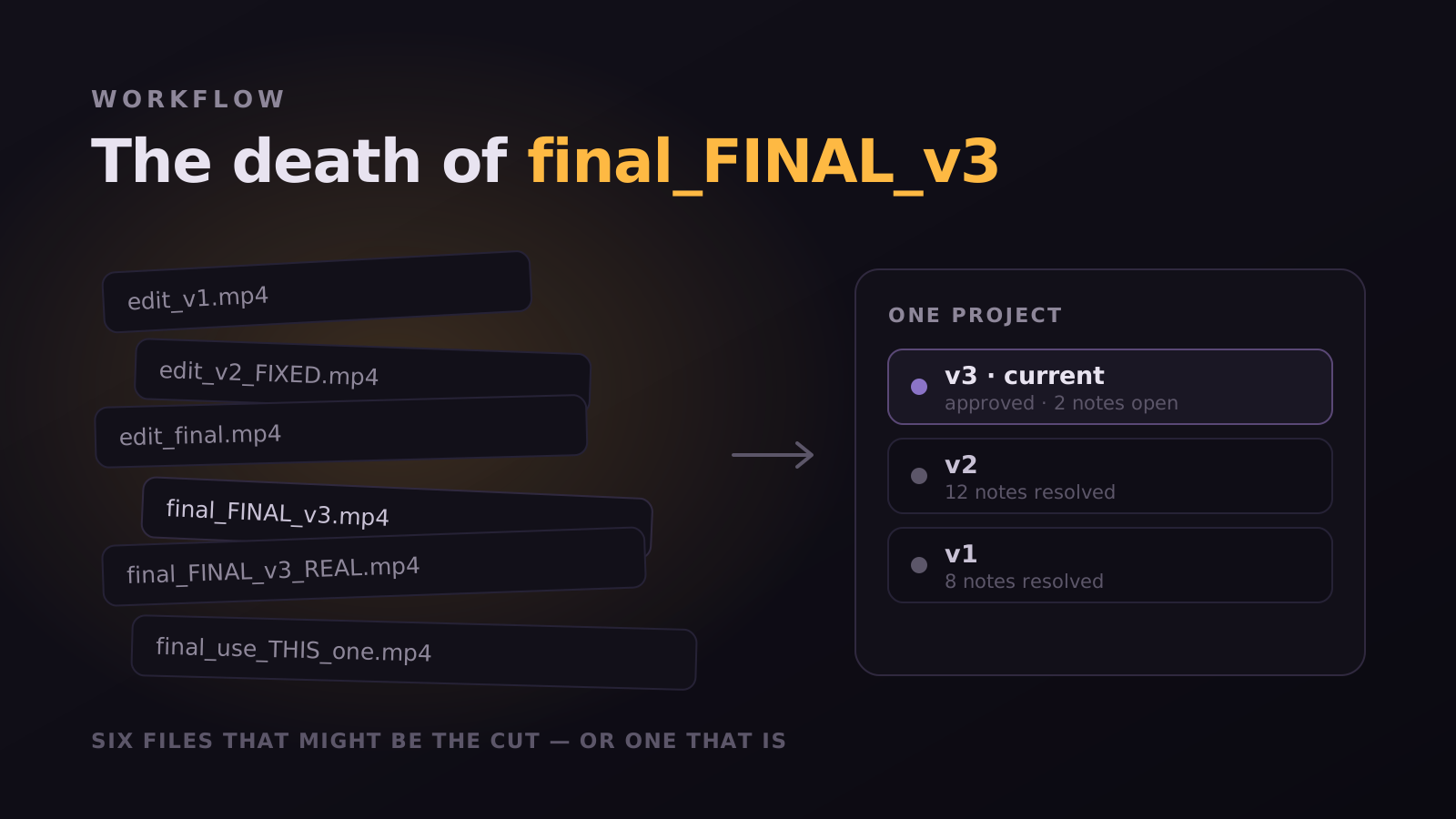
There's a folder on every editor's drive that looks like this: final.mp4, final_v2.mp4, final_FINAL.mp4, final_FINAL_v3.mp4, final_FINAL_v3_clientnotes.mp4, final_FINAL_v3_USE_THIS_ONE.mp4. It's a meme because it's universal. And it's universal because the tools we use treat every export like a fresh stranger.
Why this keeps happening
Cloud drives are file dumps. They don't know which MP4 supersedes which. They can't carry feedback forward. So every time you export a new cut, you create a brand new artifact with no connection to the conversation that produced it. The next reviewer opens the file, scrolls back through Slack, and tries to reconstruct what was supposed to change.
The filename is doing a job it was never designed for. "final_FINAL_v3_USE_THIS_ONE" is a database record encoded in a string, maintained by hand, with no validation and no history. It is the only place the ordering lives, so it grows increasingly desperate suffixes as the project goes on.
The real cost is not the mess
Untidy folders are annoying but survivable. The expensive failure is shipping the wrong file. It happens on the last day, under deadline, when three near-identical exports sit in the same directory and the one with the client-approved audio mix is not the one with the newest timestamp.
- The wrong cut goes to the client, and the mistake is only visible after they watch it
- Two people work from different versions and their changes silently diverge
- An approval refers to "the latest version," which nobody can identify a week later
- A revert is impossible because the intermediate file was cleaned up to save space
What versioning should actually do
- Every new cut is a version of the same project, not a new file
- Comments and decisions from V1 carry forward to V2 automatically
- Reviewers see what's new, what's resolved, and what's still open
- Approvals are tied to a specific version: no "wait, which one did you approve?"
In Magpiie, V2 isn't a new file. It's the same project, one timeline forward. Open V2 and you can see every V1 comment ghosted into the player: with a green checkmark on the ones the editor addressed, and a yellow flag on the ones still open. The reviewer doesn't have to remember what they said last week. The platform does.
Versions are a record, not just a pointer
Once versions are first-class, a question that used to require archaeology becomes a lookup. Why is the intro shorter than the script? Open V2, read the comment that asked for it, see who approved the change and when. The project stops being a pile of files and starts being a history you can query.
"I haven't named a file "final_v3" in six months. I genuinely forgot the muscle memory existed."
What a version stack replaces
The filename convention is not a habit, it is a workaround. People append final and REAL and v3b because the filesystem has no concept of the same thing at a later point in time. It only knows about different files, so every revision has to pretend to be a new object.
A version stack removes the need for the convention entirely. Drag a new cut in and it stacks in chronological order under the same draft. The latest is obvious at a glance, prior versions stay one click away, and you can restore any of them without hunting through an archive folder. Replacing a file does not orphan the comments already attached to it.
- V4 sits above V3, which sits above V2, in one place with one name.
- Each version carries its own uploader, timestamp and release notes.
- Every draft shows a status: Draft, Editing, In Review, Changes Requested, or Approved.
- Reviewers are always pointed at the latest version, which is the actual fix for feedback arriving on a superseded cut.
That last point is where the money is. The expensive version failure is rarely that someone could not find the newest file. It is that a client spent forty careful minutes reviewing one you had already replaced, and now you have to decide whether to tell them.
Versions carry decisions, not just bytes
A folder of files records what a cut looked like. It records nothing about why. The argument that produced the change, the note that was rejected, the person who signed off, all of that lives in a chat somewhere or in nobody's memory at all.
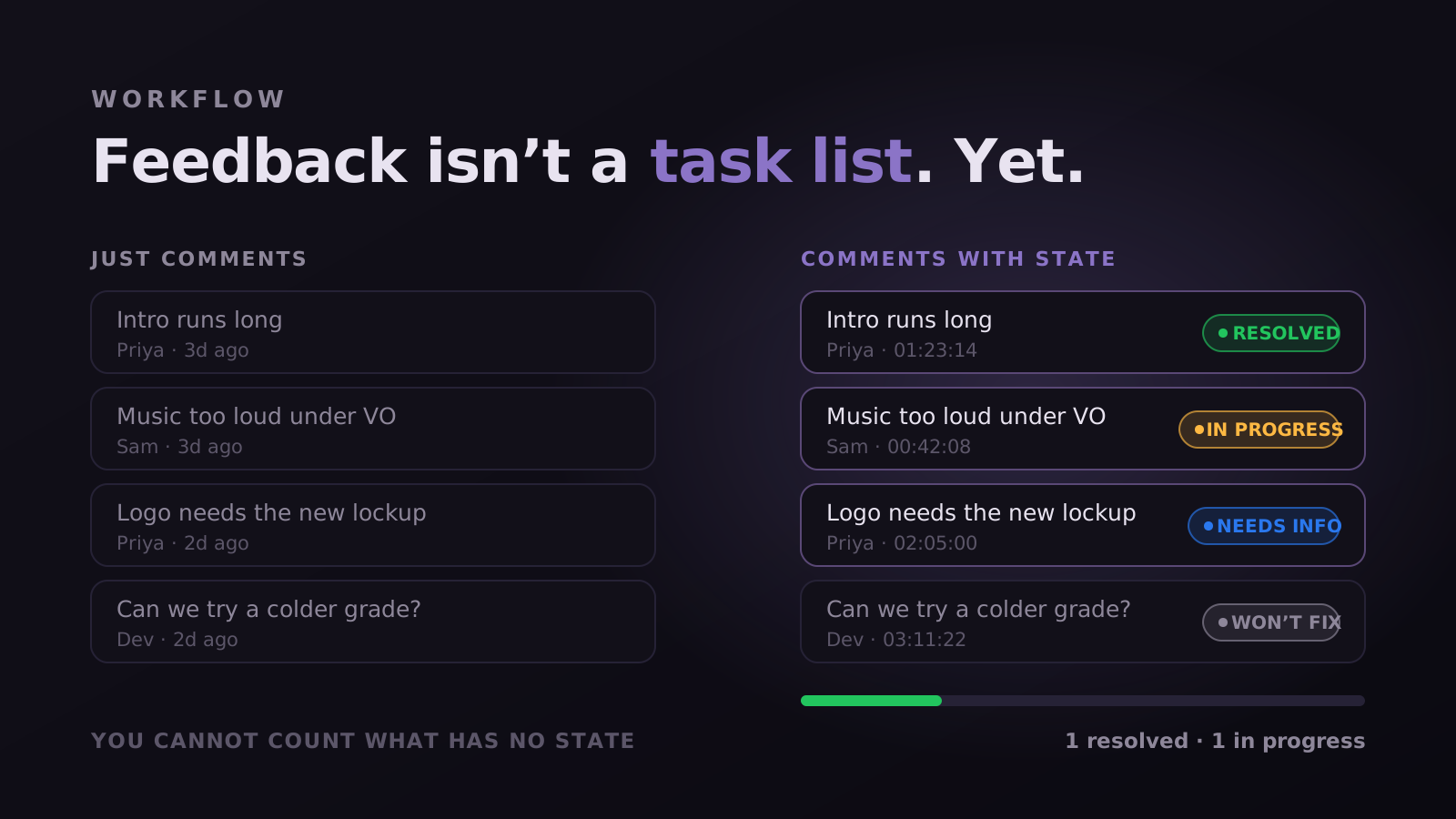
When versions live in the review tool, the reasoning travels with them. Notes stay pinned to their frames, each with an author, a timestamp, a category and a state. Anything marked Won't fix keeps its reasoning attached, so a decision made in round two does not come back as a fresh suggestion in round five. Approvals are recorded against a specific version rather than against the project in general.
Who approved this, and which cut were they looking at? Three weeks later that is the only version question that actually matters, and no naming convention has ever answered it. A timestamped approval against a numbered version turns an argument into a lookup.
Comparing two versions without the stopwatch
Even with a clean stack, one hard question remains: what actually changed between these two. The manual method is to open both, scrub in parallel and take notes, which is slow, error-prone and the single most tedious hour in a revision cycle.
Compare does that mechanically. Pick any prior version to diff against, and the previous round's notes ghost onto the new cut as dashed outline markers, positioned frame-accurately so they never blur into this round's comments. Each keeps its state, so you walk the list confirming what landed and reopening what did not, in one pass rather than two windows.
Reopening is the part worth noticing. In a folder-based workflow a fix that later breaks is invisible, because the note was closed and closed things are never re-read. Here it goes back to Open on the new version and the history shows the round trip, which is how regressions stop being folklore.
Migrating out of the folder
Nobody should reorganise an active production mid-flight. The transition that works is boring on purpose.
- Leave finished projects where they are. Closed feedback on delivered work is rarely reopened, and moving it buys nothing.
- Start with the next project that begins fresh, so the stack is complete from V1 rather than starting at V4 with no history behind it.
- Upload the current cut as V1 for anything already in flight, and treat the folder as an archive rather than a working directory.
- Agree that the tool is the source of truth from that day. Half-migrated is worse than either state, because now there are two places to check.
The habit that takes longest to break is the reflex export to Drive "just in case". It is worth breaking deliberately, because the moment a second copy exists, the naming convention comes back within a fortnight and brings final_v3_REAL with it.
The version questions worth being able to answer
A useful way to audit your current setup is to ask what it costs to answer five ordinary questions. If any of them requires messaging a person, the filesystem is still doing a job it was never designed for.
- Which cut is current? Should take one glance, not a comparison of modified dates.
- What changed between this one and the last? Should be a diff, not a parallel scrub with a stopwatch.
- Who approved it, and which version were they watching? Should be a timestamped record, not a search through email.
- What did we decide not to change, and why? Should be attached to the note, not living in someone's memory.
- Can I get back the version from two weeks ago? Should be a restore, not a hunt through an archive drive.
Most teams can answer the first with effort and fail the rest. That failure is invisible day to day, because everyone compensates without noticing: the producer remembers, the editor keeps a private spreadsheet, the folder gets one more subfolder called OLD. It only becomes visible when the person doing the compensating is unavailable.
Which is the real argument here. The naming convention is not embarrassing because it is untidy. It is a sign that the record of your decisions is being held by people rather than by the work, and people leave, forget, and go on holiday at the worst possible moment.
"final_v3_REAL.mp4 is not a filename. It is a team telling you their tool has no memory."
Stop reading. Start shipping.
Try Magpiie on your next draft. 30-day free trial on Creator Crew, auto-renews and cancel anytime. Bring your team in five minutes.