'/%3e%3cpath%20d='M20%200C31.0454%200.000263888%2039.9999%208.95455%2040%2020C39.9999%2030.962%2031.1805%2039.8647%2020.25%2039.999C20.2428%2039.9991%2020.2348%2039.999%2020.2275%2039.999V40C20.2173%2040%2020.2065%2039.9991%2020.1963%2039.999C20.1311%2039.9996%2020.0653%2040%2020%2040V39.9941C18.9137%2039.9663%2017.8401%2039.7415%2016.835%2039.3252C15.76%2038.8799%2014.7828%2038.227%2013.96%2037.4043C13.137%2036.5813%2012.4835%2035.6036%2012.0381%2034.5283C11.5928%2033.4531%2011.3633%2032.3005%2011.3633%2031.1367V21.1904L15%2023.29V31.1367C15%2031.823%2015.1358%2032.5026%2015.3984%2033.1367C15.6611%2033.7708%2016.0459%2034.3477%2016.5312%2034.833C17.0164%2035.3181%2017.5927%2035.7032%2018.2266%2035.9658C18.842%2036.2207%2019.5013%2036.3546%2020.167%2036.3623C20.1795%2036.3622%2020.1925%2036.3625%2020.2051%2036.3623C29.1474%2036.2525%2036.3632%2028.9687%2036.3633%2020C36.3632%2010.9629%2029.0371%203.63698%2020%203.63672C18.3456%203.63673%2016.7505%203.88277%2015.248%204.33789L11.2344%202.01953C11.3217%201.97623%2011.4102%201.93338%2011.499%201.8916C14.081%200.677617%2016.9642%201.31978e-05%2020%200Z'%20fill='url(%23paint1_linear_3622_27254)'/%3e%3ccircle%20cx='13.179'%20cy='17.2727'%20r='2.27273'%20fill='%237F6AA0'/%3e%3cdefs%3e%3clinearGradient%20id='paint0_linear_3622_27254'%20x1='32.2865'%20y1='6.36342'%20x2='-0.0294657'%20y2='36.0851'%20gradientUnits='userSpaceOnUse'%3e%3cstop%20offset='0.163105'%20stop-color='%23D76F70'/%3e%3cstop%20offset='1'%20stop-color='%237F6AA0'/%3e%3c/linearGradient%3e%3clinearGradient%20id='paint1_linear_3622_27254'%20x1='40'%20y1='0'%20x2='9.66985'%20y2='38.7763'%20gradientUnits='userSpaceOnUse'%3e%3cstop%20stop-color='%23DB6F6E'/%3e%3cstop%20offset='1'%20stop-color='%23F7BA29'/%3e%3c/linearGradient%3e%3c/defs%3e%3c/svg%3e)
If you searched for video collaboration software, you probably were not shopping for a category. Something concrete broke. A client sent nine notes in a WhatsApp voice message. An editor cut the wrong scene because "the bit near the end" meant two different bits. A version went live with last week's thumbnail. The category is what the internet offers you in response, so it is worth knowing what is actually in it before you pay for any of it.
We build one of these tools, which you should factor in. What follows is the honest version: what the category does, the part every vendor is quietest about, the questions that actually separate these products, and the jobs where we would tell you to buy something else.
What video collaboration software actually is
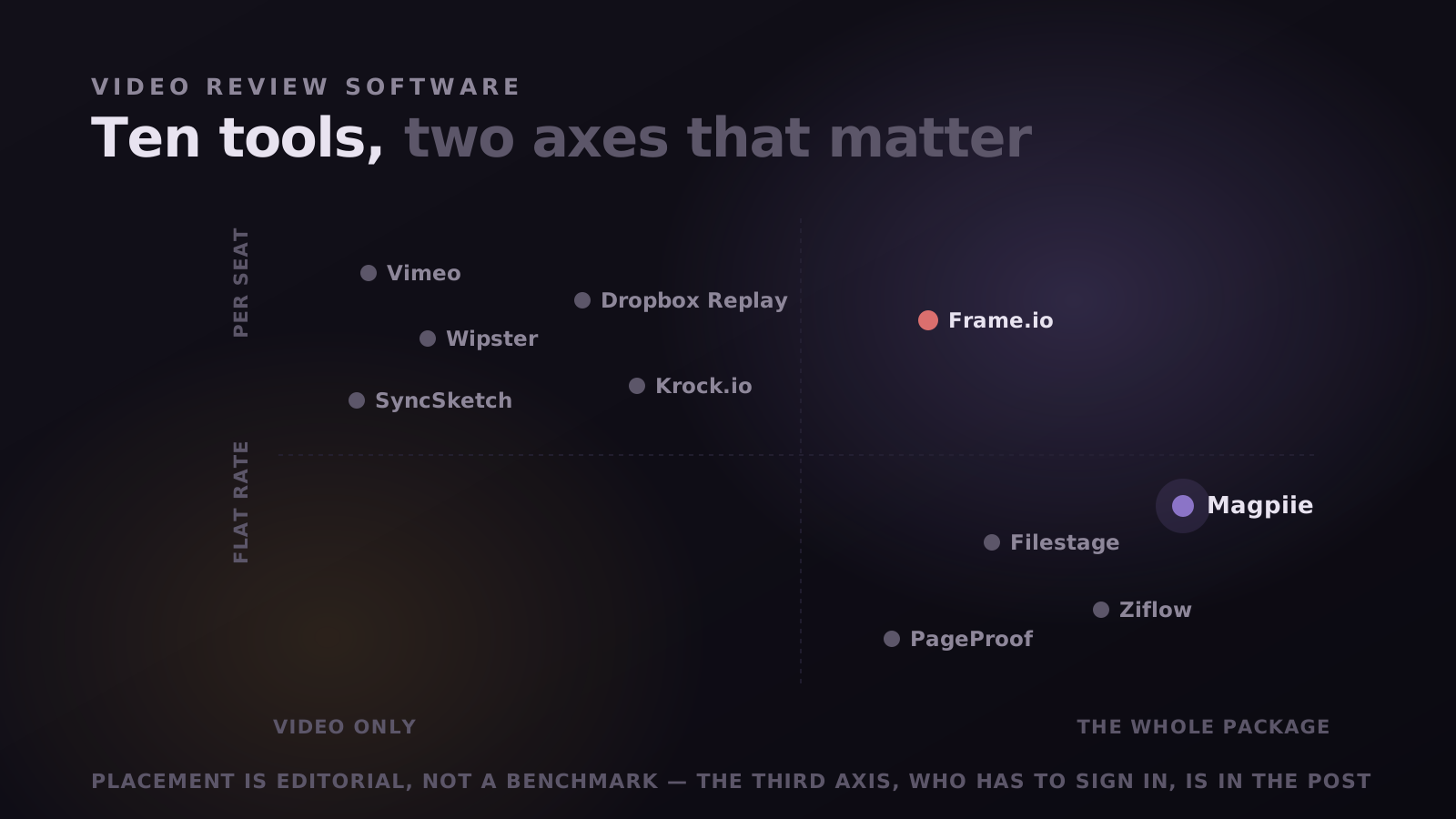
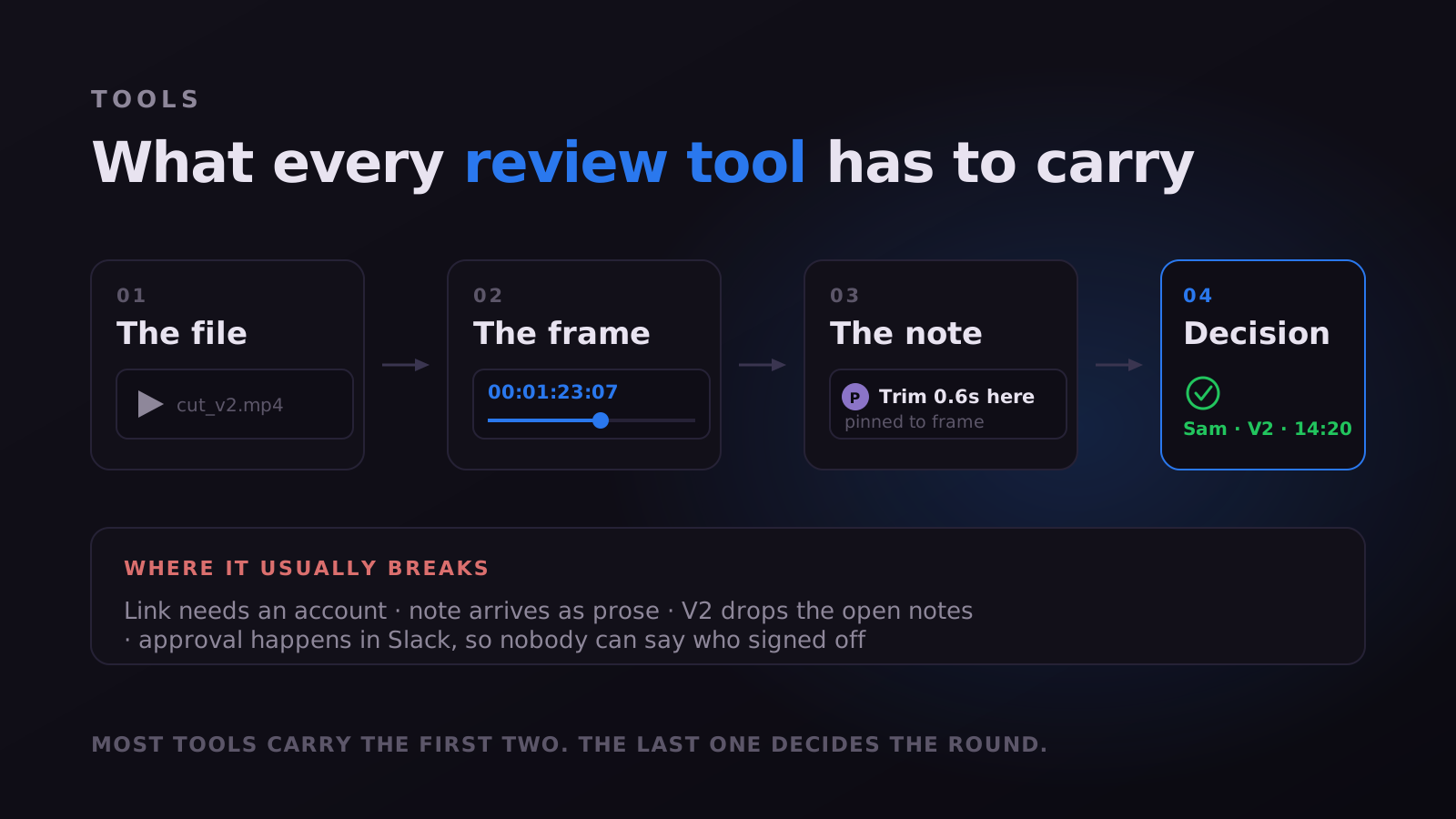
It is a shared place to put a cut so other people can respond to it precisely. That is the whole category. Magpiie, Frame.io, Filestage, Ziflow, Dropbox Replay and Vimeo Review all sit in it, and underneath the branding they are each trying to carry the same four things: the file, the exact moment being discussed, the note attached to that moment, and the record of who agreed it was done.
It is not video conferencing. Zoom and Meet put people in a room at the same time, which is the opposite problem. Review tools exist precisely so nobody has to book that meeting. And it is not cloud storage: Drive will hold your file happily and has no idea what a frame is, which is why "the cut feels off around 1:23" is a sentence that exists at all.
File, frame, note, decision. Whatever you are evaluating, check it carries all four. Most tools nail the first two, do something adequate with the third, and quietly leave the fourth to your inbox, which is why approvals still go missing in teams that pay for a review tool.
The part nobody demos: the comment box
Every product page in this category leads with the player, the version stack, the integrations. Almost none of them lead with the comment box, and the comment box is where the whole thing lives or dies, because it is the one surface a non-expert has to use unaided.
Think about who is actually typing in it. Not your editor. A client, a channel owner, a producer, a founder who watched the cut on a phone between two meetings. They are holding a feeling, not a timecode: the intro drags, the middle sags, something about the music. Converting that feeling into "trim 0.6s from the shot at 00:01:23:07" is editorial work, and every review tool that ships an empty text box is asking a marketing manager to do editorial work for free.
So they approximate, and you get "around 1:23." The fix is not training clients to think like editors. It is making pointing easier than describing: click the frame, the note pins there, the playhead snaps to it when the editor opens it. That sounds small. It is most of the value in the category.
What a review round actually looks like
Feature lists are hard to compare because everyone lists the same features. A round is easier. Here is the sequence every one of these tools is trying to shorten, and the step where each one tends to fail.
- You upload the cut. Every tool does this. Speed varies, nothing else does.
- You send it to reviewers. This is failure point one: if the link demands an account, a percentage of your reviewers stop here, and you will never be told they stopped.
- They watch and comment. Failure point two: if commenting is a bare text field, you receive prose and pay the translation tax on every line.
- You cut V2 and upload it. Failure point three: if the new version does not carry the unresolved notes forward, someone re-reads the old thread and something gets missed.
- Someone approves it. Failure point four, and the most common: approval happens in Slack or email, so three weeks later nobody can say who signed off, or on which version.
Uploading and cutting are solved everywhere. Sending, commenting and approving are where these products genuinely differ, and none of that is on the pricing page.
Where Magpiie sits in this
We built Magpiie around two decisions that shape everything else. The first: reviewers never make an account. They open a link, click the frame, type, send. The second: the review surface covers the whole deliverable, not only the video, so the thumbnail, the script and the audio get the same frame-accurate commenting and version history as the cut.
The second one exists because of how YouTube work actually fails. The video is approved, the thumbnail lives in a Drive folder someone commented on in March, and the title was agreed in a Slack thread that has scrolled away. Nothing was neglected. The pieces were just reviewed in four places, so no single place knows whether the package is ready.
- Frame-accurate comments on video, and their equivalents elsewhere: a specific thumbnail, a script line, an audio timestamp.
- Version stacking that carries unresolved notes onto the new cut. Hit Compare, pick any prior version, and markers from the previous round ghost onto the timeline as dashed outlines so they never blur into the current comments, each keeping its own state.
- A per-version approval with a name and a timestamp, so "who signed off on this" is a lookup rather than an argument.
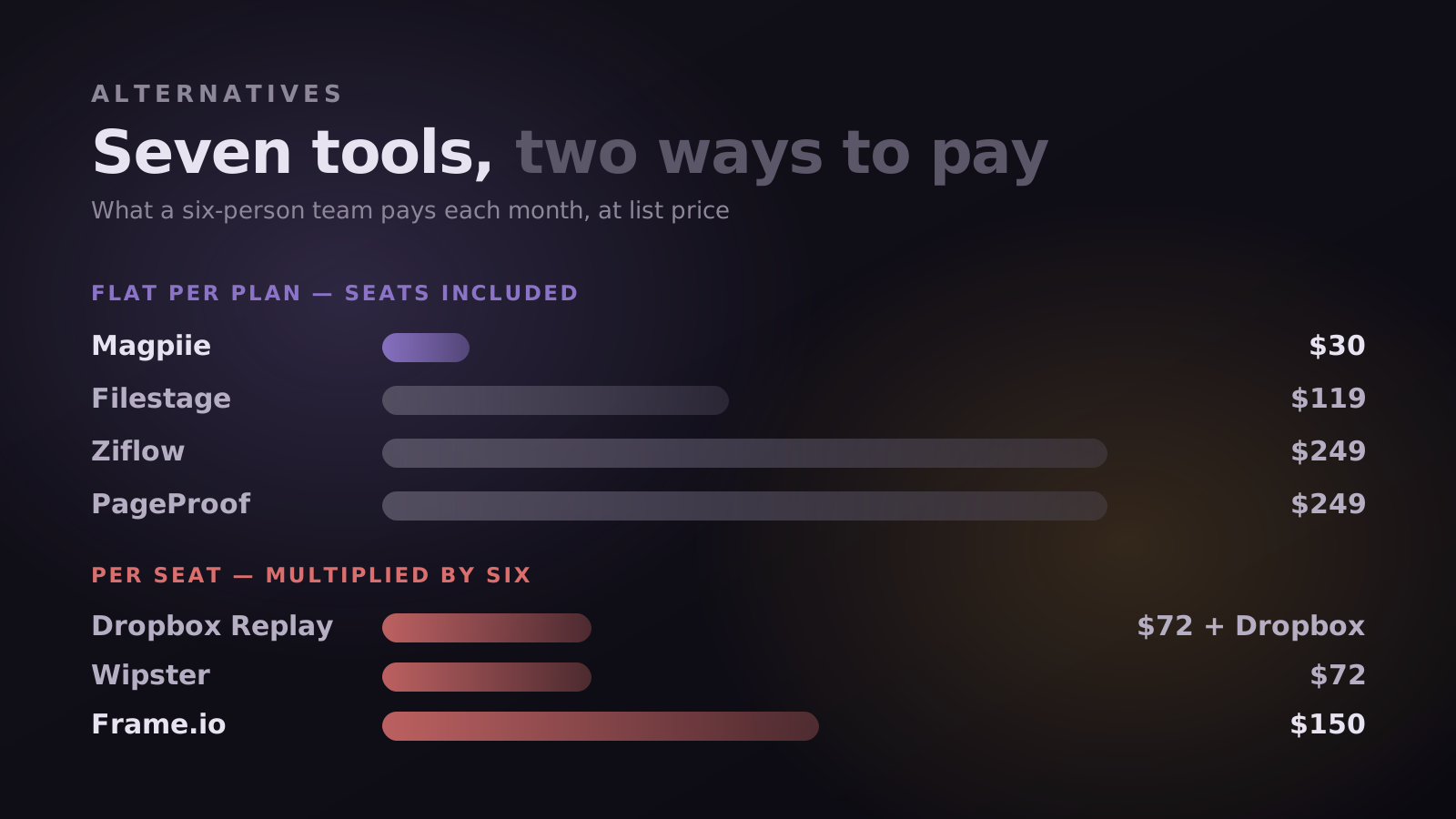
- Flat per-plan pricing. Adding an editor, a freelance producer or a reviewer does not change the invoice.
"The thing that changed was not the commenting. It was that the client stopped needing me to explain how to leave a comment."
The vocabulary a review tool needs
Category guides tend to compare players and integrations. The thing that actually determines whether a tool shortens a round is duller: how much a single note can carry. A comment that is only text and a timestamp pushes every other decision back onto a human, usually you, usually later.
A note worth its place carries four things beyond its content. A location, so it points rather than describes. A category, visual, audio, text, timing or graphics, so work can be batched by discipline instead of tackled in the arbitrary order comments arrived. A priority, Must Fix or Suggestion, so urgency is declared rather than guessed at from phrasing. And a state, so it has a life rather than merely an existence.
- Open. Raised, not started.
- In progress. Owned right now, which is the state that stops the duplicate chase.
- Needs info. Unactionable as written, returned as a question instead of a guess that costs an export.
- Resolved. Done and ready to verify, gone from the active list but not from the history.
- Won't fix. Declined on purpose, reasoning attached, so it does not return as a fresh idea in round four.
Four of those five states exist to stop a conversation happening twice. That is the real product of structured feedback, and it is the axis on which these tools differ most while looking most alike. Freehand drawing on the frame covers the remainder: the notes where a reviewer can see the problem and has no vocabulary for it, which is most thumbnail feedback ever written.
Two link types, and why the difference matters
Every vendor in this category claims clients can review without friction, and the claims blur two different things. "No account" and "no paid seat" are not the same promise, and neither is "can view" the same as "can comment".
In Magpiie a secure review link is the one you send to someone whose feedback you want: they watch and comment, with no signup at any point. A public link is watch-only, for wider circulation where people should see the cut but not annotate it. Sending the wrong one is a common own goal, because a stakeholder who cannot comment will email you their notes instead, and you are back to prose describing a moment nobody can find.
Whatever a feature grid says, open your own review link in a private window, signed out, on a phone. Whatever happens next is exactly what happens to the person whose reply you are waiting on. Most teams have never done this, and most are surprised by at least one step.
How the round ends
The fourth item in the file, frame, note, decision test is where most of this category is thinnest, and it is worth knowing what a complete answer looks like.
A draft carries a status everyone can see, Draft, Editing, In Review, Changes Requested, or Approved, so silence is never load-bearing. A readiness indicator shows whether every blocking note is closed, with suggestions surfaced separately so a good idea does not hold a publishable cut hostage. Approval is recorded against a specific version with a name and a timestamp. An activity record writes itself as work happens, tracking who requested each change and when each revision landed, so nobody has to keep a side log for it to exist a month later.
The last piece is who does the chasing. If the answer is you, follow-up arrives late and sounds apologetic. Notifications that reach editors the moment feedback lands, alert reviewers when a new revision is ready, surface reminders on stale reviews, and let each person choose a digest over live pings, move that job into the tool. Reviewers being pointed at the latest version quietly removes the most wasteful failure in the category: careful feedback delivered on a cut you replaced two days ago.
When Magpiie is the wrong tool
A category guide that concludes "buy ours" is an ad. These are the jobs where we would genuinely point you elsewhere, and they are not edge cases.
- You need footage moving off the camera during the shoot. Camera to Cloud in Frame.io has no equivalent here. If your bottleneck is the shoot rather than the review round, that feature outweighs everything on this page.
- You want comments inside the Premiere timeline. We are editor-agnostic, which means we work with any NLE and are a browser tab rather than a panel. If your editors will not leave the timeline, that is a real cost.
- You are archiving camera originals and masters. We size storage for work in flight, not for a library. Tools that sell terabytes are selling something we are not.
- Your approval chain is a compliance process, with multi-stage routing, legal sign-off and regulated audit trails across documents as well as video. Filestage and Ziflow are built for that shape of work and we are not.
- Most of your reviewing happens on a phone, on the move. We work on mobile, but we are designed for someone sitting in front of the cut.
Five questions to ask before you buy
These separate the products far better than feature grids do, because every vendor answers the feature grid the same way.
- Can my least technical client comment without an account? Do not take the answer on faith. Send yourself a link from a browser you are not logged into and try it.
- What happens to unresolved notes when I upload V2? If they do not travel, your team re-reads old threads forever.
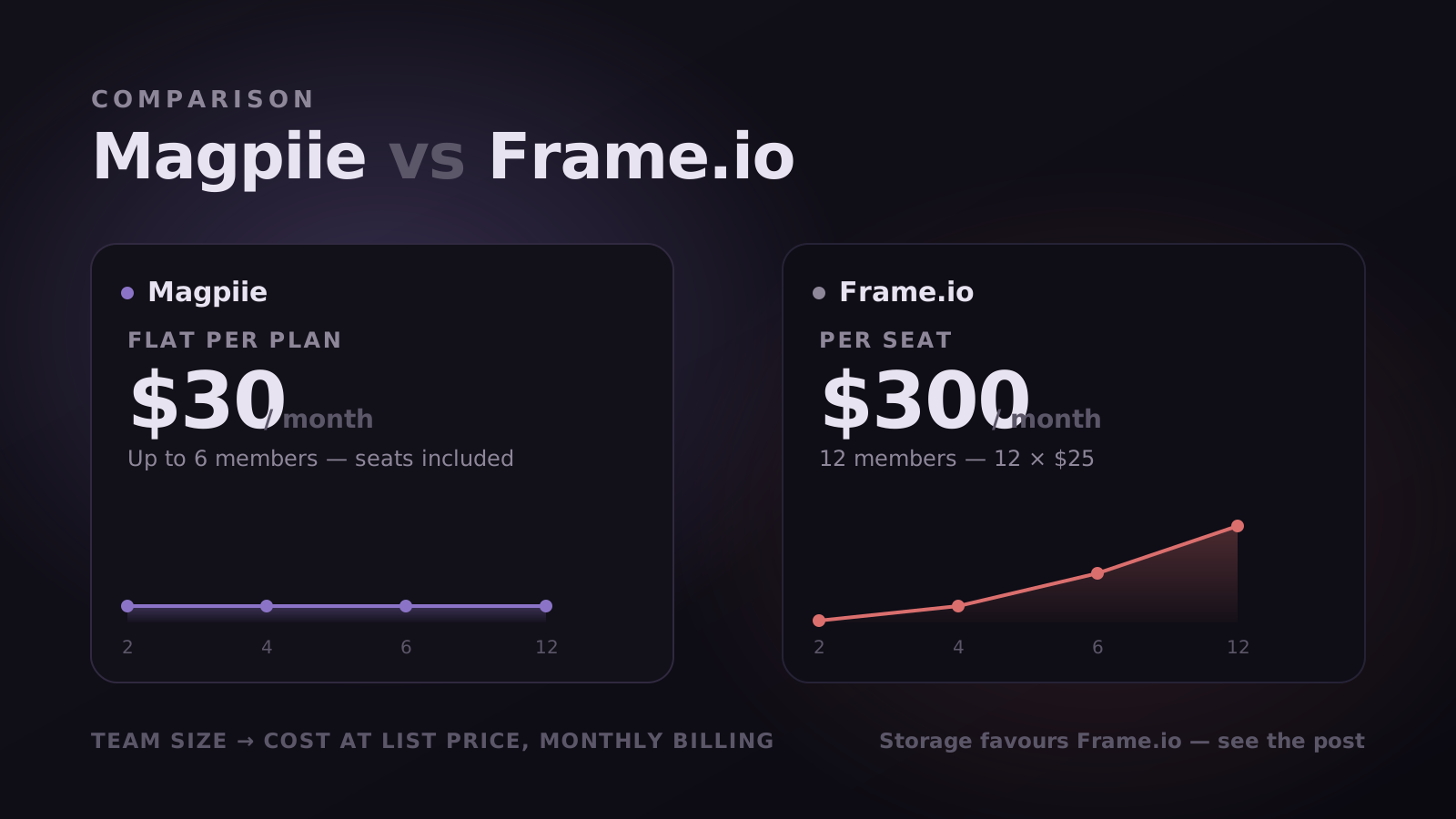
- Am I billed per seat or per plan? Model it at double your current headcount. Per-seat pricing is fine until you hire, and then it is the reason people migrate.
- Where does approval get recorded? If the answer is "however you like," approvals will end up in Slack and you will not have a record.
- What else besides video can I review here? If thumbnails and scripts live in another tool, the package is only ever partly approved.
Feature comparisons cannot tell you what a real cycle can. Take the next project that starts fresh, run it end to end, and send the client link first: the client is the variable you cannot control, so test them earliest. Whether notes arrive without a chasing email is usually the entire decision.
Where the category is heading
Two things are shifting. The first is that review is being pulled earlier: teams increasingly want sign-off on the script and the thumbnail before an editor opens a timeline, because a cut built on an unapproved script is a rewrite waiting to happen. That is a bet we already made.
The second is that transcripts and automatic summaries are becoming table stakes. That is useful, and worth being clear-eyed about: summarising twelve vague comments produces a tidy summary of twelve vague comments. Precision has to happen at the moment the note is written. Nothing downstream recovers it.
The third is that the category is splitting. Some of these tools are becoming media infrastructure, optimising for capture, transfer and storage at scale. Others are becoming approval systems for regulated marketing work. A smaller group, ours included, is trying to cover the distance from idea to published rather than only the review round in the middle.
Since a roadmap says more about a vendor than a feature grid does, here is ours specifically. We are building along three tracks: Coordination, to make production legible so less of it lives in Slack; Insight, to turn the work and the audience into decisions; and Creative and AI, to reduce friction around the creative parts of the job rather than automate them.
- Already shipped: frame-accurate commenting on video, thumbnails, scripts and audio; Compare and Smart Revisions, so every prior note carries onto the new cut as a clean diff; and Collaboration Hub, the real-time workspace tied to the cut.
- In private beta: workflow and task management, meaning Tasks and Accountability, per-stage boards with auto-assignment and an audit trail, plus Auto-Sync Workflow, where upload triggers assignment and approval triggers publish. Cinematic Storage and an optional AI Co-Pilot are in beta too.
- Still ahead: Mood Boards; YouTube Analytics, identifying which twelve seconds to re-cut; Scripting Studio, putting timestamped script segments on the player timeline; YouTube Publishing, turning a green readiness chip into a scheduled upload; Brand Guidelines with inline checks; and Performance Tracking.
Whichever vendor you are evaluating, ask to see this. Dates slip everywhere, ours included, so read published quarters as intent rather than contract. What a roadmap reliably tells you is priority, which is to say what that team thinks the job actually is. If every item on it is a minor refinement of what already exists, that is an answer too.
Common questions
Is video collaboration software the same as video conferencing? No. Conferencing gets people into a room simultaneously; review tools exist so they do not have to be. If your review still requires a call, the tool is not doing its job.
Do clients need an account to leave feedback? In Magpiie, no, a link is enough. In much of the category, viewing is open but real commenting expects an account, so verify this specifically rather than assuming.
Is there a free option? Magpiie has a free forever plan: two members, five projects, 5 GB. Most competitors offer something similar. Free plans in this category are limited by storage and project count rather than by the review features themselves, so you can test the part that matters. Downloadable drafts and public share links are the paid-plan gates.
Does it work with my editor? Magpiie is editor-agnostic and sits outside your NLE, so Premiere, Resolve, Final Cut and CapCut all work the same way: you export and upload. If you specifically want comments appearing inside the timeline, that is territory Frame.io owns today.
Which one is best? None of them, in the abstract. If your bottleneck is the shoot, buy for capture. If it is compliance routing, buy for approvals. If it is the days spent waiting on a client who cannot work out how to leave a note, that is the one we built for.
Stop reading. Start shipping.
Try Magpiie on your next draft. 30-day free trial on Creator Crew, auto-renews and cancel anytime. Bring your team in five minutes.