'/%3e%3cpath%20d='M20%200C31.0454%200.000263888%2039.9999%208.95455%2040%2020C39.9999%2030.962%2031.1805%2039.8647%2020.25%2039.999C20.2428%2039.9991%2020.2348%2039.999%2020.2275%2039.999V40C20.2173%2040%2020.2065%2039.9991%2020.1963%2039.999C20.1311%2039.9996%2020.0653%2040%2020%2040V39.9941C18.9137%2039.9663%2017.8401%2039.7415%2016.835%2039.3252C15.76%2038.8799%2014.7828%2038.227%2013.96%2037.4043C13.137%2036.5813%2012.4835%2035.6036%2012.0381%2034.5283C11.5928%2033.4531%2011.3633%2032.3005%2011.3633%2031.1367V21.1904L15%2023.29V31.1367C15%2031.823%2015.1358%2032.5026%2015.3984%2033.1367C15.6611%2033.7708%2016.0459%2034.3477%2016.5312%2034.833C17.0164%2035.3181%2017.5927%2035.7032%2018.2266%2035.9658C18.842%2036.2207%2019.5013%2036.3546%2020.167%2036.3623C20.1795%2036.3622%2020.1925%2036.3625%2020.2051%2036.3623C29.1474%2036.2525%2036.3632%2028.9687%2036.3633%2020C36.3632%2010.9629%2029.0371%203.63698%2020%203.63672C18.3456%203.63673%2016.7505%203.88277%2015.248%204.33789L11.2344%202.01953C11.3217%201.97623%2011.4102%201.93338%2011.499%201.8916C14.081%200.677617%2016.9642%201.31978e-05%2020%200Z'%20fill='url(%23paint1_linear_3622_27254)'/%3e%3ccircle%20cx='13.179'%20cy='17.2727'%20r='2.27273'%20fill='%237F6AA0'/%3e%3cdefs%3e%3clinearGradient%20id='paint0_linear_3622_27254'%20x1='32.2865'%20y1='6.36342'%20x2='-0.0294657'%20y2='36.0851'%20gradientUnits='userSpaceOnUse'%3e%3cstop%20offset='0.163105'%20stop-color='%23D76F70'/%3e%3cstop%20offset='1'%20stop-color='%237F6AA0'/%3e%3c/linearGradient%3e%3clinearGradient%20id='paint1_linear_3622_27254'%20x1='40'%20y1='0'%20x2='9.66985'%20y2='38.7763'%20gradientUnits='userSpaceOnUse'%3e%3cstop%20stop-color='%23DB6F6E'/%3e%3cstop%20offset='1'%20stop-color='%23F7BA29'/%3e%3c/linearGradient%3e%3c/defs%3e%3c/svg%3e)
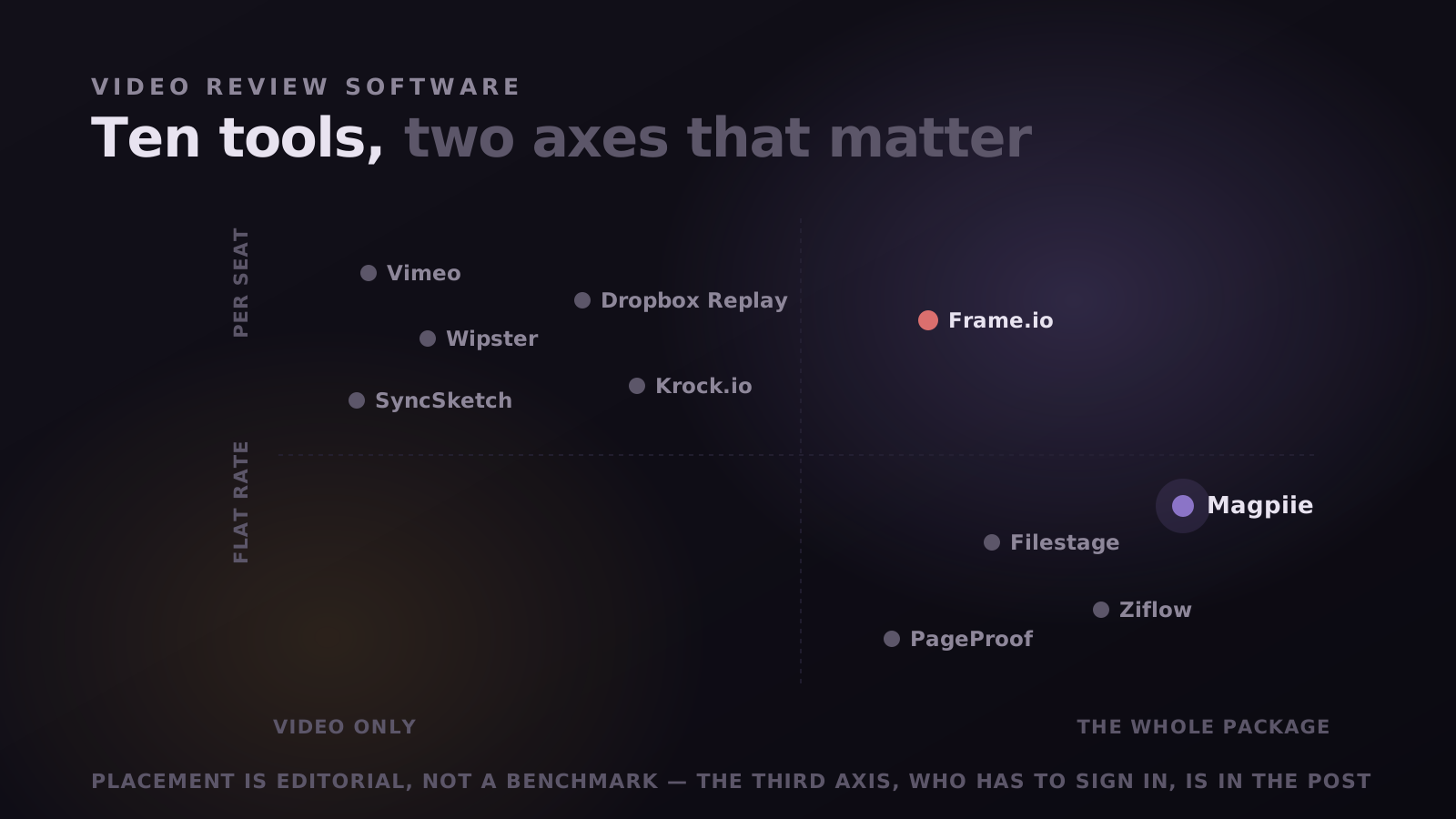
We make one of the tools on this list, so weigh it accordingly. The useful version of a post like this is not a ranking but a sorting: these products look interchangeable on a feature grid and are not. Below is what each is genuinely for, with prices you can check, and the situations where the honest answer is to keep paying Frame.io.
Frame.io is a good product, worth saying plainly because most alternatives posts are written as though the incumbent were bad. It is a media platform with Camera to Cloud, native Adobe panels and terabytes of storage. If that is the job, nothing here beats it. People leave for a narrower reason: they are paying platform prices for the slice that sends a link and collects comments.
Why teams look for an alternative at all
The reasons cluster into three, and only one is about money.
- The bill scales with headcount, not usage. Per seat is invisible at four people and loud at fifteen. A producer who opens the tool twice a month costs the same as the editor living in it, and freelancers make it worse.
- The bill scales with headcount, not usage. Per-seat pricing is invisible at four people and loud at fifteen. A producer who opens the tool twice a month costs the same as the editor living in it, and freelancers make it worse: you either pay for a seat you use for three weeks or you do not add them at all.
- Clients stall at the login. This is the one that actually costs days. A client who has to make an account before typing a sentence is a client who replies on Thursday instead of Tuesday, and nobody ever tells you that the signup was the reason.
- Most of the platform goes unused. Asset management, transfer, presentations, storage tiers. Teams shipping a weekly video use the player, the comments and the version stack, and paying for the rest is fine until a renewal makes you look at it.
- Most of the platform goes unused. Asset management, transfer, presentations, storage tiers. Teams shipping a weekly video use the player, the comments, and the version stack. Paying for the other eighty percent is fine until a renewal makes you look at it.
"If your bottleneck is the shoot, none of this matters. If your bottleneck is waiting on a reply, it is the only thing that matters."
When you should stay on Frame.io
Put this first, because for many readers it ends the search. Any one is enough on its own.
- You need footage off the camera during the shoot. Camera to Cloud has no real equivalent anywhere on this list, ours included. If an editor is cutting before the crew wraps, that feature outweighs every price on this page.
- Your editors want comments in the timeline. Frame.io lives inside Premiere Pro and After Effects. Most alternatives, again ours included, are a browser tab. If your team will not leave the NLE, that is a genuine cost.
- You archive originals and masters where you review. Frame.io sells terabytes and adds more per seat; tools built for work in flight are not sized for a library.
- You need forensic watermarking, DRM or a signed enterprise SLA. If deliverables are under embargo, that is a requirement rather than a preference.
The seven, in one table
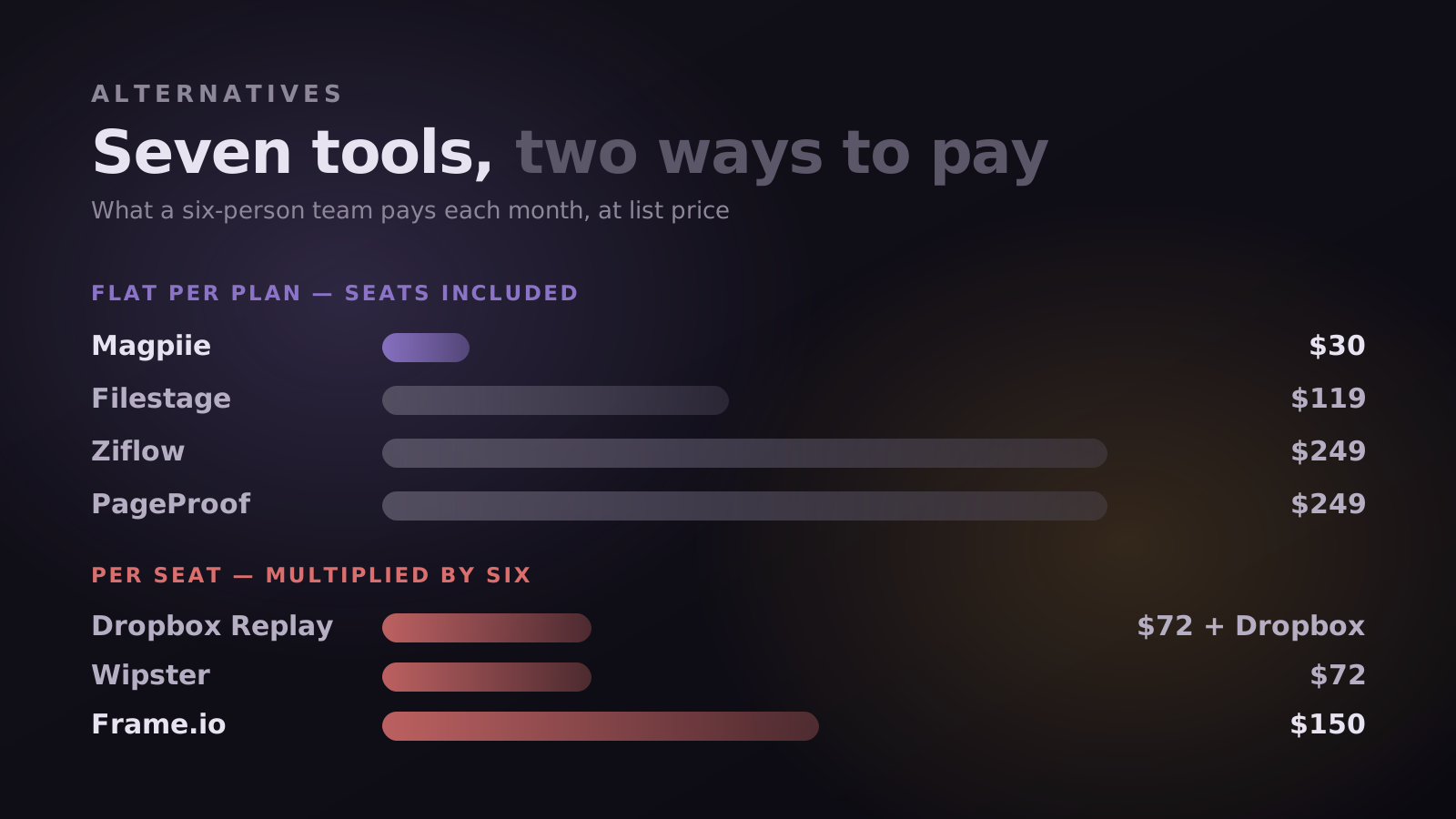
List prices as published in September 2026, monthly where a monthly option exists. Everyone on this list changes pricing without telling us, so confirm on their site before you decide on cost alone.
Dropbox Replay is the one people mis-cost most often. The $12 is per user and sits on top of a Dropbox subscription, so six people means six Replay seats plus six Dropbox seats. That is how a $10 line item becomes $150.
The rundown, one by one
1. Magpiie, if the package is the problem
Disclosure again: ours. Magpiie is a review and revision workspace built around two decisions. Clients never make an account, and the review surface covers the whole deliverable rather than only the video. Thumbnails, scripts, and audio get the same commenting and version history as the cut, because a YouTube video is approved when the package is approved, not when the timeline is.
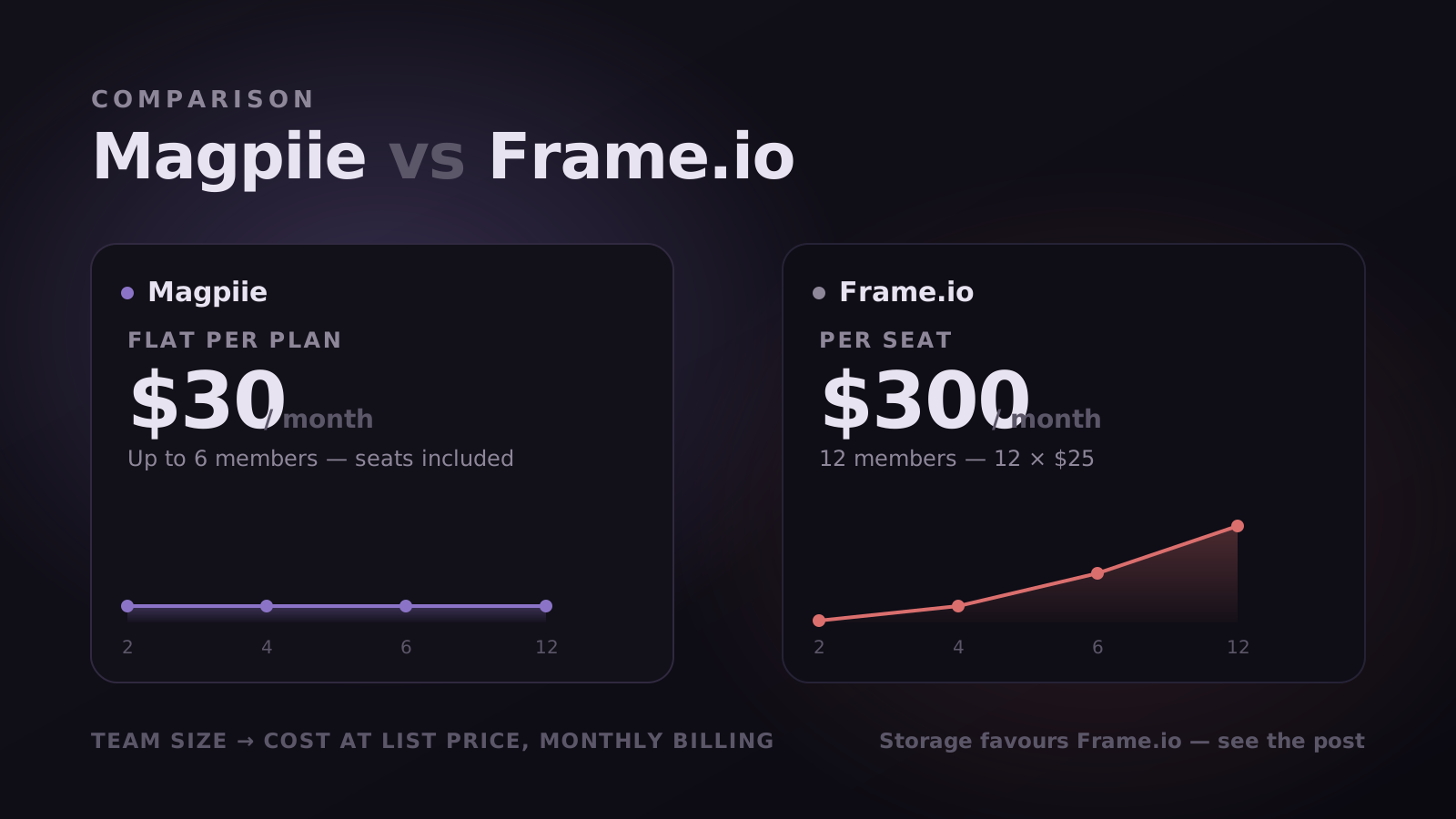
Pricing is flat per plan rather than per seat: free forever for two members with 5 GB, $30 a month for up to six with 500 GB, $60 a month for up to twelve with 1 TB. Adding an editor or a freelance producer does not change the invoice. Frame-accurate comments, auto version stacking, and separate internal and client comment threads are on every plan including the free one.
The feature we would defend as distinctive is Compare. Every tool here stores versions; almost none answer the question you have when V4 lands, which is not "what is in this cut" but which of the notes from the previous round it actually fixed.
It removes the most exhausting loop in production: the manual cross-check, two tabs open, scrubbing the new cut with the old comment thread beside it. You can diff against any prior version, and it is what makes the revision summary a verifiable list of outcomes rather than a claim that you addressed everything.
Where it is weak, and this is not throat-clearing: there is no on-set capture, no Premiere or After Effects panel, and storage is sized for work in flight rather than for an archive. Client share links and downloadable drafts start on the paid plans, so the free tier is a real workspace for two people rather than a full client-facing setup. Slack and Premiere integrations are on the roadmap, which means they do not exist today.
Best for YouTube creators, creator agencies running several channels, and small film or short-film houses up to about twelve people shipping on a weekly cadence.
2. Wipster, if you want a lighter Frame.io
Wipster is the most straightforward like-for-like swap on this list. It is video-native, comments are frame-accurate, and there is a Premiere panel, so the shape of the workflow barely changes. It is still per seat, which means it solves the interface complaint rather than the pricing one. At ten people you are back around $250 a month, and the reason you left may follow you.
3. Filestage, if approval is a process
Filestage is proofing rather than editing: sequential review stages, defined approver groups, due dates, and the same treatment for a PDF or a landing page as for a cut. If your video needs sign-off from legal and a brand team before it goes anywhere, this shape fits far better than a video review tool does. If your review is one client and one editor, it is heavy furniture.
4. Ziflow, if compliance is watching
Ziflow is Filestage with the enterprise dial turned further: automated routing, granular permissions, and audit trails built for regulated industries. Pharma, finance, and large agencies buy it for reasons that have nothing to do with editing being pleasant. If nobody has ever asked you for an audit trail, this is not your tool.
5. PageProof, if reviewer count is the problem
PageProof charges a flat rate with unlimited users, which is the right answer for a specific and common situation: a small core team and a very large cast of occasional reviewers. Its centre of gravity is print and digital proofing rather than video, so editors will find it less native than Wipster or Frame.io, but the seat math is unusually kind at scale.
6. Dropbox Replay, if you already live in Dropbox
If your footage is already in Dropbox and your team already pays for it, Replay adds frame-accurate comments and version comparison without introducing a new place to look. That integration is the entire case for it. It is thinner than the dedicated tools on versioning and approval, and the true cost is the add-on plus the storage plan beneath it, which is not how it is usually quoted.
7. Frame.io, if you were never really the problem
Worth listing seventh rather than not at all. Many teams who go looking for an alternative are on the wrong Frame.io plan rather than the wrong product. Check whether you are on Team when Pro covers your headcount, or paying for archive storage that belongs somewhere colder. Migration is expensive in a way a plan change is not.
Who we actually built this for
Most tools above were designed around a film set or a marketing department. Magpiie was designed around a publishing schedule, which is why three groups get more out of it than a broadcast facility would.
- YouTube content creators. The thumbnail, title, script and voiceover all need sign-off before publish, and in most tools three of those live elsewhere. Here they are versions of the same project, so nothing ships with an approved cut and an unapproved thumbnail.
- Creator agencies. The client is the bottleneck you cannot control, and a link that needs no signup is the difference between notes on Tuesday and notes next week. Flat pricing means adding a freelance editor mid-campaign does not change the invoice.
- Movie and short-film houses. Rounds run through a director, a producer, a colourist and often a financier who has never opened a review tool. Frame-accurate notes, Compare and a timestamped approval per cut record who signed off, without handing everyone a seat.
The bet underneath all three is that review is being pulled earlier: teams want sign-off on the script and the thumbnail before an editor opens a timeline, because a cut built on an unapproved script is a rewrite waiting to happen.
Here is what that looks like as work in progress, across three tracks: Coordination, making production legible so less of it lives in Slack; Insight, turning the work and the audience into decisions; and Creative and AI, reducing friction around the creative parts of the job rather than automating them.
- Shipped: frame-accurate commenting across video, thumbnails, scripts and audio; Compare and Smart Revisions, carrying prior notes onto the new cut as a clean diff; and Collaboration Hub, the real-time workspace tied to the cut.
- In private beta: workflow and task management, meaning Tasks and Accountability, per-stage boards with an audit trail, plus Auto-Sync Workflow, where upload triggers assignment and approval triggers publish. Cinematic Storage and an optional AI Co-Pilot are also in beta.
- Still ahead: Mood Boards, YouTube Analytics, Scripting Studio, YouTube Publishing, Brand Guidelines and Performance Tracking.
Dates on any roadmap slip, ours included, so treat published quarters as intent rather than contract. The useful signal is priority, and it is worth asking of every vendor here.
What we are deliberately not building matters just as much. Magpiie does not edit, host, transcode or manage your project plan. Saying no keeps the review surface fast, which is the only thing we are trying to be best at. If you want the whole pipeline in one login, that points back to Frame.io.
What to actually test when you trial any of these
Every tool here demos well, because a demo is one person walking the happy path. The differences appear in the parts nobody demos, and four of them decide most rounds.
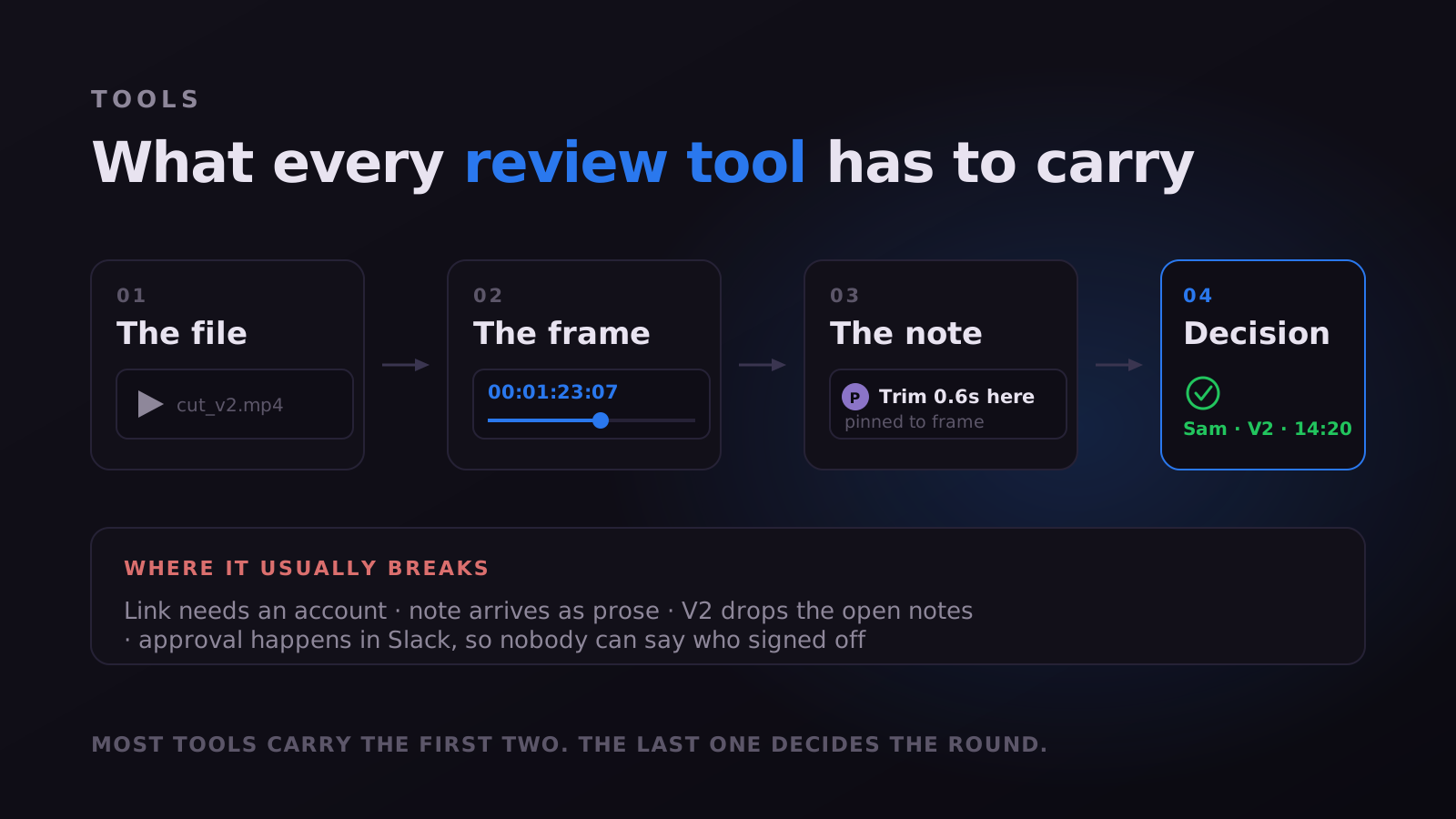
First, how a reviewer gets in, and be precise about the claim. "No account" and "no paid seat" are different promises, and "can view" is not "can comment". Magpiie has two link types for exactly this reason: a secure review link, where the person watches and comments with no signup at any point, and a public link that is watch-only for wider circulation. Send the wrong one and a stakeholder who cannot comment will email you their notes instead, which puts you back to prose.
Second, how much a single note carries. Text and a timestamp alone push every remaining decision onto a person. Notes here carry a category, visual, audio, text, timing or graphics, so an editor batches by discipline; a priority, Must Fix or Suggestion, so urgency is stated rather than inferred from tone; and freehand drawing for notes where someone sees the problem but has no words for it.
- Open. Raised, nobody has started.
- In progress. Someone owns it, which removes most of the duplicate chasing.
- Needs info. Not actionable as written, so it returns as a question rather than a confident wrong guess.
- Resolved. Fixed and ready to verify, gone from the active list but kept in the history.
- Won't fix. Declined deliberately with the reasoning attached, so it does not come back as a fresh idea in round four.
Third, what the second round costs. Upload a V2 with notes still open on V1 and watch. Here the prior notes sync onto the new cut frame-accurately, ghosting onto the timeline as dashed outline markers, each keeping its state. If notes do not travel, someone re-reads an old thread every round.
Fourth, how the round ends. A quiet thread is ambiguous: approved, or merely busy. Every draft carries a visible status, Draft, Editing, In Review, Changes Requested or Approved, and a readiness indicator reports whether every blocking note is closed, with suggestions listed separately. Approvals are timestamped against a specific version, and an activity record writes itself as work happens.
If follow-up is a person's job it happens late and sounds apologetic. Editors should hear the moment feedback lands, reviewers when a new revision is ready, with reminders surfacing on stale reviews and a digest option for everyone who does not want live pings. Reviewers being pointed at the latest version removes the most wasteful failure in this category: careful feedback delivered on a cut you already replaced.
Common questions
What is the closest free alternative to Frame.io? Magpiie is free forever for two members with 5 GB, five projects and frame-accurate comments; Ziflow and Vimeo have free tiers too. Free plans here are limited by seats, storage and project count rather than by the review features, so you can test the part that matters. Client share links and Compare start on the paid plans.
Do clients need an account to leave feedback? In Magpiie, no: a secure review link is enough. Elsewhere viewing is usually open while real commenting expects an account, so verify this one yourself.
Which is cheapest? Dropbox Replay looks cheapest until you add the Dropbox plan underneath. At six or more people flat rate wins outright: $30 covers six on Magpiie against $150 for six Frame.io Team seats. Under three people, free tiers cover you.
Can I keep my old comments when I switch? No. Comment threads do not transfer between these products. Leave finished work where it is, run new projects in the new tool, and let the old subscription lapse at renewal.
Is there anything that does Camera to Cloud as well? Not on this list. That is the one place Frame.io has a genuine moat, and if you need it, the rest of this post is academic.
All prices were checked against each vendor’s public pricing page in September 2026, monthly list rates, no annual discounts applied. Magpiie is not affiliated with or endorsed by any product named here. Vendors change pricing without notice, so confirm before deciding on cost alone, and if something here is out of date, tell us and we will correct it.
Stop reading. Start shipping.
Try Magpiie on your next draft. 30-day free trial on Creator Crew, auto-renews and cancel anytime. Bring your team in five minutes.