'/%3e%3cpath%20d='M20%200C31.0454%200.000263888%2039.9999%208.95455%2040%2020C39.9999%2030.962%2031.1805%2039.8647%2020.25%2039.999C20.2428%2039.9991%2020.2348%2039.999%2020.2275%2039.999V40C20.2173%2040%2020.2065%2039.9991%2020.1963%2039.999C20.1311%2039.9996%2020.0653%2040%2020%2040V39.9941C18.9137%2039.9663%2017.8401%2039.7415%2016.835%2039.3252C15.76%2038.8799%2014.7828%2038.227%2013.96%2037.4043C13.137%2036.5813%2012.4835%2035.6036%2012.0381%2034.5283C11.5928%2033.4531%2011.3633%2032.3005%2011.3633%2031.1367V21.1904L15%2023.29V31.1367C15%2031.823%2015.1358%2032.5026%2015.3984%2033.1367C15.6611%2033.7708%2016.0459%2034.3477%2016.5312%2034.833C17.0164%2035.3181%2017.5927%2035.7032%2018.2266%2035.9658C18.842%2036.2207%2019.5013%2036.3546%2020.167%2036.3623C20.1795%2036.3622%2020.1925%2036.3625%2020.2051%2036.3623C29.1474%2036.2525%2036.3632%2028.9687%2036.3633%2020C36.3632%2010.9629%2029.0371%203.63698%2020%203.63672C18.3456%203.63673%2016.7505%203.88277%2015.248%204.33789L11.2344%202.01953C11.3217%201.97623%2011.4102%201.93338%2011.499%201.8916C14.081%200.677617%2016.9642%201.31978e-05%2020%200Z'%20fill='url(%23paint1_linear_3622_27254)'/%3e%3ccircle%20cx='13.179'%20cy='17.2727'%20r='2.27273'%20fill='%237F6AA0'/%3e%3cdefs%3e%3clinearGradient%20id='paint0_linear_3622_27254'%20x1='32.2865'%20y1='6.36342'%20x2='-0.0294657'%20y2='36.0851'%20gradientUnits='userSpaceOnUse'%3e%3cstop%20offset='0.163105'%20stop-color='%23D76F70'/%3e%3cstop%20offset='1'%20stop-color='%237F6AA0'/%3e%3c/linearGradient%3e%3clinearGradient%20id='paint1_linear_3622_27254'%20x1='40'%20y1='0'%20x2='9.66985'%20y2='38.7763'%20gradientUnits='userSpaceOnUse'%3e%3cstop%20stop-color='%23DB6F6E'/%3e%3cstop%20offset='1'%20stop-color='%23F7BA29'/%3e%3c/linearGradient%3e%3c/defs%3e%3c/svg%3e)
Every list like this is written by someone with a stake in it, and this one is no exception: we make Magpiie. So rather than ask you to trust a ranking, here is the method. Prices come from the public pricing page of each vendor in September 2026, at monthly list rates. Every tool gets the same three questions. Where we lose, the row says we lose.
The useful finding, after running production on several of these, is that feature grids are nearly worthless here. All ten do timestamped comments on video. What differs is narrower: what you are allowed to review, who is forced to create an account, and what happens to your invoice when you hire someone.
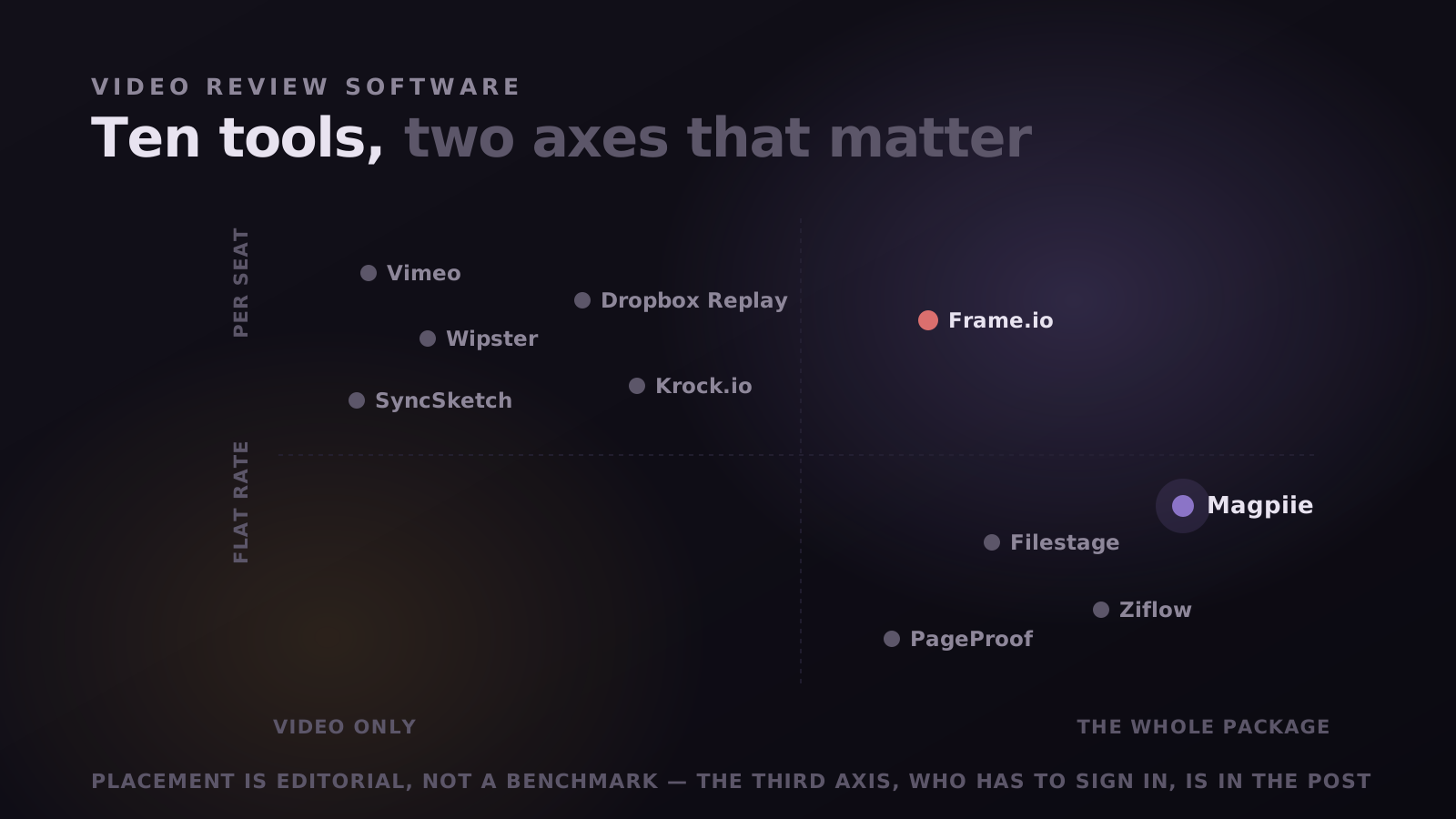
The three axes that actually separate them
Almost every meaningful difference in this category reduces to one of three questions. Answer them for your own team first, and the shortlist writes itself.
- What can you review? Some take video only, some video plus documents, a few the whole deliverable: cut, thumbnail, script, audio. If three of the four things you ship live elsewhere, no amount of frame-accuracy fixes a package that is only partly approved.
- Who has to sign in? The one that costs days rather than dollars. If a client must create an account before typing a sentence, some fraction silently defer it, and nobody tells you the signup was the reason.
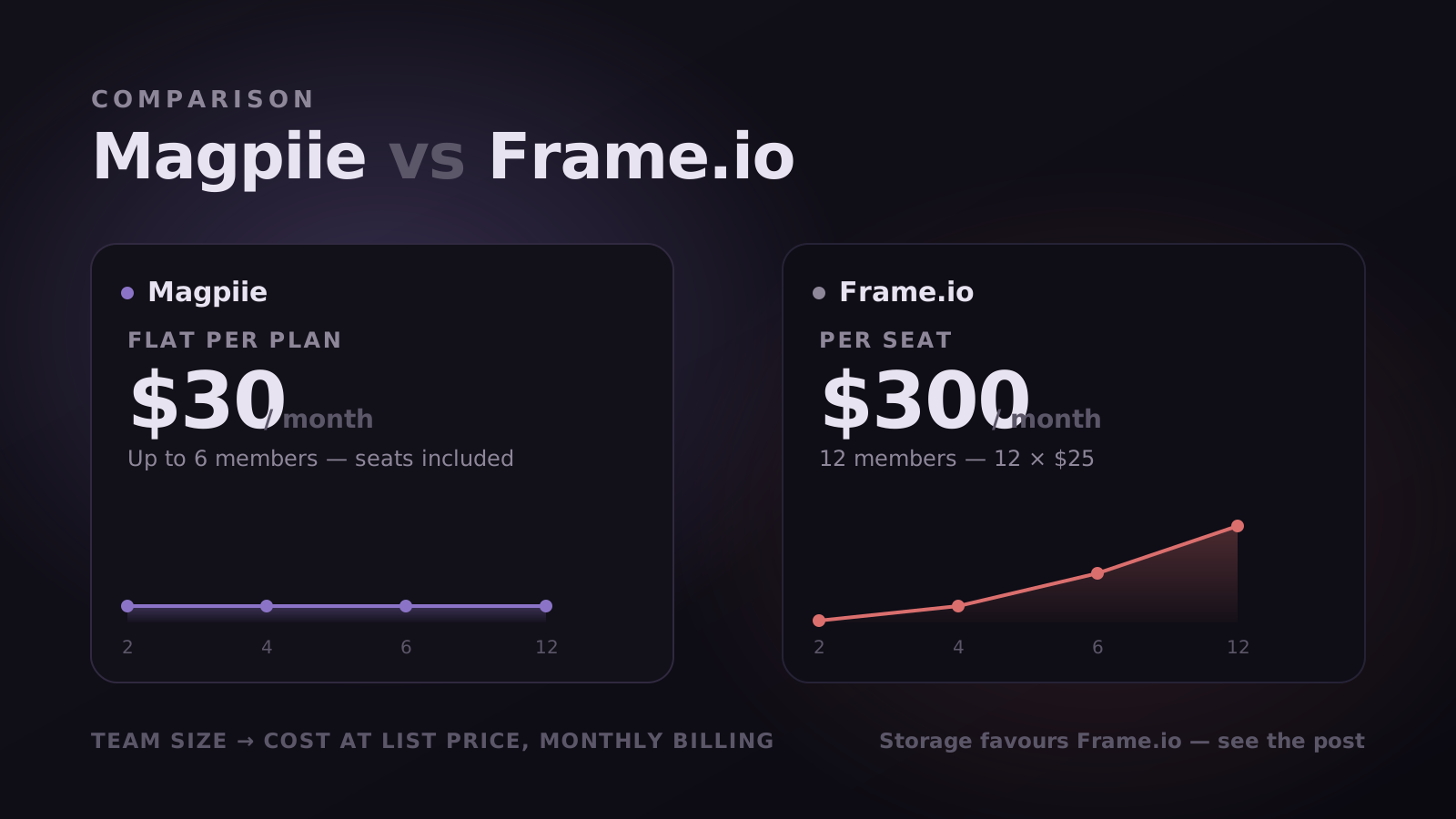
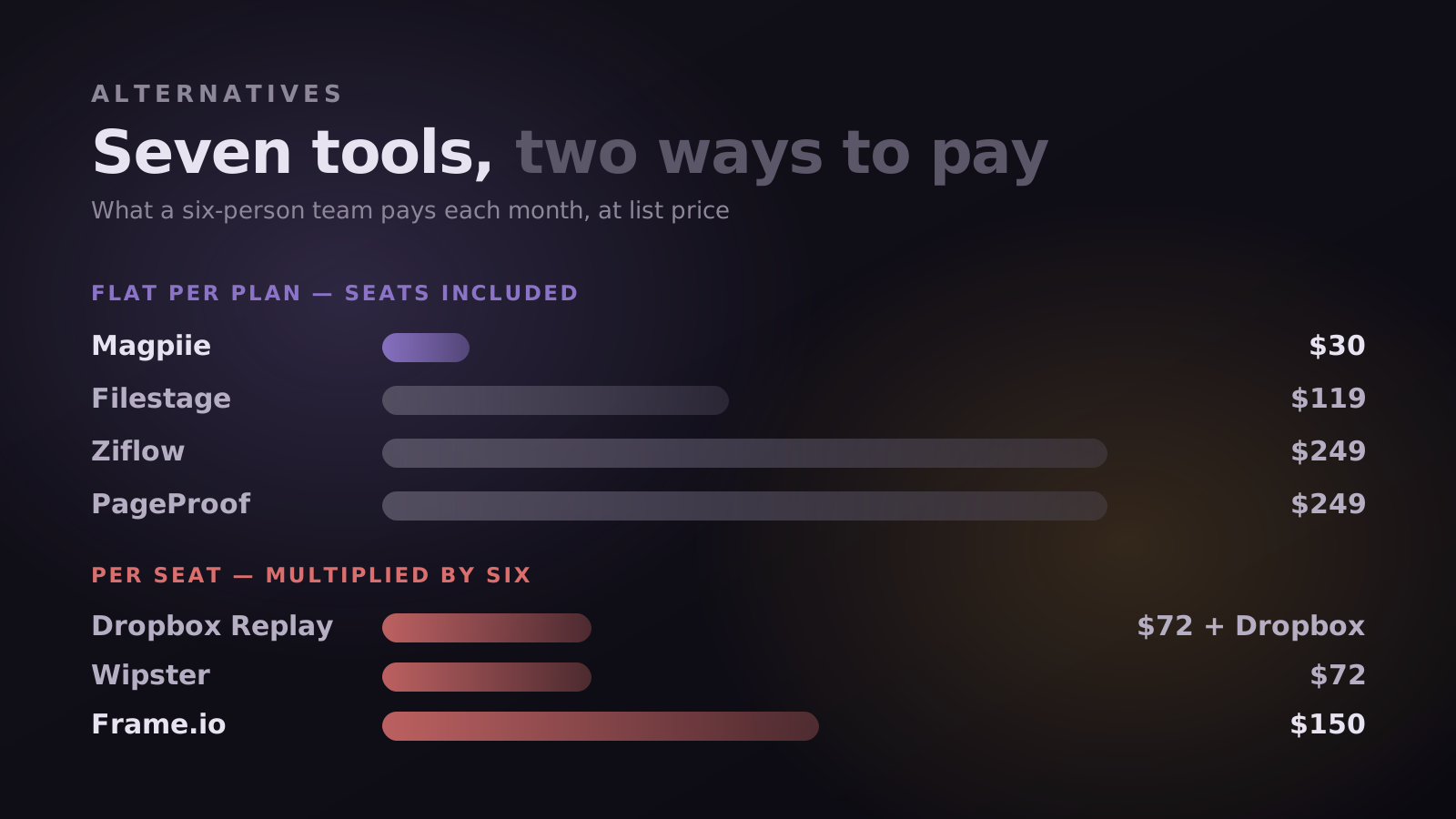
- How does the bill scale? Per seat is invisible at four people and painful at fifteen; flat rate is the reverse. Neither is better in the abstract, they are bets on your headcount curve.
"The best video review software is the one your least technical client actually uses. Everything else is a tiebreaker."
Pick by situation, not by ranking
A ranked list implies one winner, and this category does not have one. It has five or six clearly different jobs.
- You publish a weekly video and the thumbnail, script and audio need sign-off too: Magpiie (ours).
- You shoot on set and cut in Premiere: Frame.io, comfortably. Camera to Cloud has no equivalent.
- Your approval chain includes legal or brand compliance: Filestage or Ziflow.
- You have a small core team and dozens of occasional reviewers: PageProof.
- You do animation, VFX or 3D: SyncSketch, or Krock.io if you want the production pipeline around it.
- Your files already live in Dropbox and you want the cheapest adequate thing: Dropbox Replay.
- You need the video hosted publicly afterwards anyway: Vimeo.
All ten, on the three axes
Monthly list prices, September 2026. Confirm before you buy: everyone here changes pricing without telling us.
Dropbox Replay is an add-on: the per-user fee sits on top of a Dropbox subscription, so six people means six Replay seats plus six Dropbox seats. And Vimeo bundles review into hosting, so you are buying a video host whether or not you need one. Both look cheap on a comparison table and frequently are not.
The ten, in detail
1. Magpiie: the whole package, not just the cut
Ours, so weigh it accordingly. The bet is that a video is not finished when the timeline is. A YouTube upload ships as a cut, a thumbnail, a title and often a voiceover, and in most tools three of those are reviewed elsewhere entirely. Here they are versions of the same project, so the package is approved or it is not.
The feature we would defend as distinctive is Compare. Every tool here stores versions; almost none answer the question you have when V4 lands, which is not what is in this cut but which of the previous notes it fixed. Prior notes sync onto the new draft frame-accurately, each keeping its own state, Open, In progress, Needs info, Resolved or declined, so you walk the list once.
Where it loses: no Camera to Cloud, no Premiere or After Effects panel, and storage sized for work in flight rather than an archive. Client review links and downloadable drafts start on the paid plans, so the free tier is a real two-person workspace rather than a full client-facing setup. Compare needs a paid plan too. Slack and Premiere integrations are roadmap, which means they do not exist yet.
Best for YouTube creators, creator agencies running several channels, and small film or short-film houses up to about twelve people shipping weekly.
2. Frame.io: the benchmark, priced like it
Still the most complete media platform here, and for on-set work nothing is close. Camera to Cloud pushes footage off the camera mid-shoot, native Premiere and After Effects panels put comments in the timeline, and storage runs to terabytes.
The cost is that you are buying a platform when many teams use one slice of it, and the bill scales with headcount rather than usage. Fuller collaboration also leans on an Adobe account, which is exactly the friction point that makes external clients stall. If your bottleneck is the shoot, none of that matters. If your bottleneck is the reply, all of it does.
3. Filestage: when approval is a process
Filestage is proofing rather than editing: sequential stages, approver groups, due dates, and the same treatment for a PDF as for a cut. Reviewers are invited by email without consuming a paid seat, which suits marketing teams with rotating stakeholders. If your review is one client and one editor, it is heavy furniture.
4. Ziflow: when compliance is watching
Ziflow is Filestage with the enterprise dial turned further: automated routing, granular permissions, audit trails for regulated industries, and the widest range of reviewable formats here. If nobody has ever asked you for an audit trail, this is not your tool.
5. PageProof: when reviewer count is the problem
A flat rate with unlimited users, the right answer to a common situation: a small core team and a large cast of occasional reviewers. Its centre of gravity is print and digital proofing rather than video, so editors find it less native than Wipster or Frame.io. But if you pay per seat for forty people who each comment twice a quarter, the arithmetic is hard to argue with.
6. Wipster: the lighter like-for-like
The most straightforward swap for a team leaving Frame.io over complexity rather than cost. Video-native, frame-accurate, with a Premiere panel, so the workflow barely changes shape. It is still per seat, so at ten people you are back near $250 a month.
7. SyncSketch: for animation, VFX and 3D
A genuinely different job. SyncSketch does synchronised real-time review, everyone on the same frame while someone draws on it, and handles image sequences and 3D models rather than flat video. For animation and VFX supervision that is the right tool. The constraints are per-seat pricing and tight storage.
8. Krock.io: the animation pipeline around the review
Krock.io wraps review in production management for animation studios: storyboards, animatics, task tracking and review in one place. Unlimited reviewers with no per-reviewer fee helps studios with large freelance rosters. Whether it fits depends on whether you want a pipeline tool or a review tool.
9. Dropbox Replay: if you already live in Dropbox
If the footage is already in Dropbox and the team pays for it, Replay adds frame-accurate comments and version comparison without another place to look. That integration is the entire case. It is thinner on versioning and approval, and the true cost is the add-on plus the storage plan beneath it.
10. Vimeo: review as a feature of hosting
Vimeo Review is competent if you already pay Vimeo to host: timestamped comments, version stacking, links that need no account. It is a feature rather than a workflow, so it thins out on revision states, carry-forward and approval records. If you need public hosting anyway the bundle is real value; if not, you are buying a host to get a comment box.
Buy the roadmap, not just the feature list
A comparison table cannot show direction. You are buying not only what a tool does this quarter but what its makers think the job is, and two products with identical feature grids can be heading somewhere completely different.
So here is ours, because it is a fair thing to be judged on. Magpiie is built along three tracks. Coordination makes production legible, so less lives in Slack. Insight turns the work and the audience into decisions. Creative and AI reduces friction around the creative parts of the job rather than automating them.
- Shipped: frame-accurate commenting across video, thumbnails, scripts and audio; Compare and Smart Revisions, carrying prior notes onto V4 as a clean diff; and Collaboration Hub, a real-time workspace tied to the cut.
- In private beta: workflow and task management, meaning Tasks and Accountability, per-stage boards with auto-assignment and an audit trail, plus Auto-Sync Workflow, where upload triggers assignment and approval triggers publish. Cinematic Storage and an optional AI Co-Pilot are also in beta.
- Still ahead: Mood Boards, YouTube Analytics, Scripting Studio, YouTube Publishing, Brand Guidelines and Performance Tracking.
Read that list and the direction is not subtle. Most tools in this category are becoming better places to store and review video. We are trying to become the place where a piece of content goes from idea to published, with review as the spine rather than the whole skeleton. That is a bigger bet and a riskier one, and it is the honest reason to pick us or not pick us.
Dates slip, ours included, so treat published quarters as intent rather than contract. What a roadmap does tell you reliably is priority: what a team considers the job. If a vendor cannot show you one, or every item is a minor refinement of what already exists, that is its own answer. Ask where a tool is heading before you commit a year of production to it.
Where each one genuinely loses
The most useful column in any roundup is the one vendors leave out. Shortest honest version of each:
- Magpiie: no on-set capture, no NLE panel, not sized for archival storage, integrations still on the roadmap.
- Frame.io: per-seat cost at scale, and an Adobe account expectation that adds friction for outside clients.
- Filestage and Ziflow: built around approval routing, so they feel like process software to a two-person edit team.
- PageProof: document-first heritage; video review is supported rather than the centre of gravity.
- Wipster: solves complexity, not cost; you are still billed per seat.
- SyncSketch: specialised for animation and VFX, with storage limits that bite on large renders.
- Krock.io: you are adopting a production pipeline, not only a review surface.
- Dropbox Replay: requires a Dropbox plan underneath, and is thin on approvals.
- Vimeo: video only, and review is a side feature of a hosting business.
The parts of a review tool nobody demos
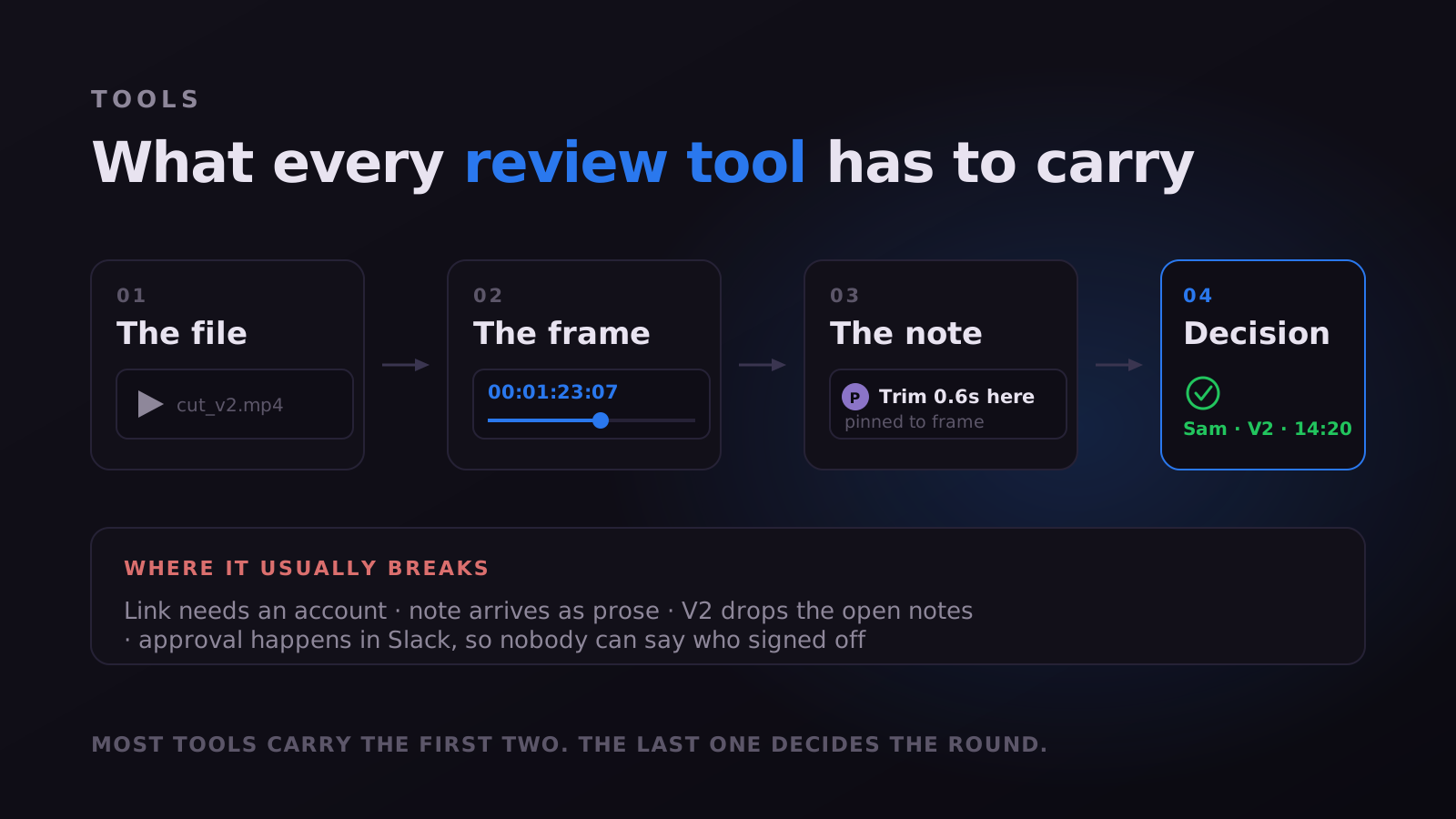
A demo is one person walking the happy path, which is why every tool here demos well. The differences live in four places nobody shows you, each checkable in an afternoon.
The first is how a reviewer gets in, and the claims are slipperier than they look. "No account" and "no paid seat" are different promises, and "can view" is not "can comment". Magpiie draws the line with two link types: a secure review link, where the person watches and comments without signing up, and a public link that is watch-only. It matters practically, because a stakeholder who cannot comment emails you their notes instead.
The second is how much a note carries beyond its text. A category, visual, audio, text, timing or graphics, lets an editor batch by discipline rather than working in the order comments arrived. A priority, Must Fix or Suggestion, states urgency instead of leaving it inferred from phrasing, and gives reviewers a volume control they otherwise lack. Freehand drawing covers the notes where someone sees the problem and has no vocabulary for it.
The third is what the second round costs, the most underrated line in any comparison. Upload a V2 with notes still open on V1 and watch. Here the prior notes sync onto the new cut frame-accurately, ghosting onto the timeline as dashed outline markers, each keeping its state, so the round becomes a walk down a list rather than a re-watch.
The fourth is how the round ends. A quiet thread is ambiguous, and teams routinely sit on cuts already accepted. Every draft carries a visible status, Draft, Editing, In Review, Changes Requested or Approved, and a readiness indicator reports whether every blocking note is closed, with suggestions listed separately.
- Approvals recorded against a specific version with a name and a timestamp, so "the client signed off" has a cut attached to it.
- An activity record written as work happens: who requested each change, when each revision landed and from whom.
- Editors notified the moment feedback arrives, reviewers when a new revision is ready.
- Reminders surfacing on reviews that have gone quiet, so chasing is not a person's job.
- Per-user notification preferences, including a digest instead of live pings.
- Reviewers always pointed at the latest version, which removes the most wasteful failure in this category.
Nothing above is exotic, and several tools here do parts of it well. The point is that all four questions are invisible on a pricing page and decisive in practice. Whichever product you are leaning toward, test entry, note richness, carry-forward and the ending before you commit a year of production to it.
Common questions
What is the best video review software? For most creator teams, whichever one your least technical client will use unaided. Beyond that it splits by job: Frame.io for on-set and Adobe workflows, Filestage or Ziflow for compliance routing, SyncSketch for animation, and Magpiie if you are approving a package rather than only a cut.
What is the best free option? Magpiie is free forever for two members with 5 GB, five projects and frame-accurate comments; Ziflow, Krock.io and Vimeo have free tiers too. Free plans here are limited by seats, storage and project count rather than by the review features. Client review links and Compare start on the paid plans.
Do clients need a paid account to leave feedback? Mostly no, but "no account" and "no paid seat" are different claims. Magpiie needs no account at all. Filestage, Ziflow and PageProof admit reviewers without a seat. Frame.io expects an Adobe account for fuller collaboration. Verify this one yourself.
Is video review software the same as video collaboration software? Broadly yes, and the terms are used interchangeably. Neither is video conferencing: review tools exist precisely so nobody has to book that call.
Can I move my old comments across when I switch? No, and treat any claim otherwise sceptically. Comment threads do not transfer between these products. Leave finished work where it is, start new projects in the new tool, and let the old subscription lapse at renewal rather than mid-cycle.
Every price was checked against the vendor's own public pricing page in September 2026, at monthly list rates with no annual discount applied. Magpiie is not affiliated with or endorsed by any product named here. Vendors change pricing without notice, so confirm before deciding on cost alone, and if something here is out of date, tell us and we will correct it.
Stop reading. Start shipping.
Try Magpiie on your next draft. 30-day free trial on Creator Crew, auto-renews and cancel anytime. Bring your team in five minutes.